
A few of years ago, Zendesk updated how the CC feature works in support tickets. The new feature is called CCs and Followers. There are many Zendesk users who still have the old CC feature. Now it is time to switch to the new one.
On October 28 2026, the old CC feature will be completely discontinued, and if you have not migrated before then, you will be automatically moved over on October 28. To avoid unexpected changes, we recommend that you do the migration well in advance.
Why is this changing?
CCs and Followers is more flexible and secure. Features such as advanced encryption and data masking are not supported in the old feature and will therefore work better now.
In the new feature, it is also clearer for both the requester and those on CC who are involved in the support thread. Additionally, agents can follow tickets without the requester seeing it.
Find out if you have the old CC feature
- If your Zendesk was set up after May 2019, you automatically have the new CC feature and can disregard this.
- Are you unsure? Check here: Admin Center → Object & Rules → Settings → CCs
If you see the button to upgrade to CCs and Followers, as in the image below, you have the old CC feature.
How to migrate to the new CCs and Followers
Start by clicking "Set up CCs and Followers" in Admin Center → Object & Rules → Settings → CCs.
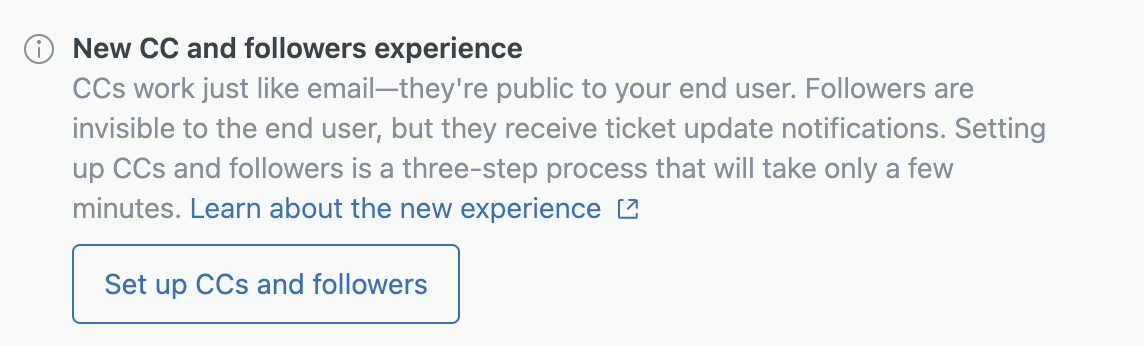
Read the instructions and proceed. A list of all your affected Zendesk rules will be displayed.
Download the list so you have it as a backup.
Choose the update method. You can either let Zendesk automatically update triggers, automations, and macros, or do it manually yourself. We recommend choosing automatic update in most cases.
When everything is updated, you are done. You will then see some settings that you can change, for example who can add CCs and whether agents should automatically become followers.
❗️ Remember to inform your agents that the interface will change.
For those of you who have a Sandbox, we recommend testing the migration there first |
Comments
0 comments
Please sign in to leave a comment.